

If you’re a beginner with Claude Code, you need to know this.
You might delete your computer — protect yourself

Claude can delete your computer, all of your drive gone.
No passing Go, no collecting $200. Just gone. No recovery, no reboot.
Like most designers when Claude Code arrived, I switched from Replit and got started using it every day — mind melting with the opportunities.
Then I started seeing friends using AI autonomously — AI working non-stop without asking for permissions until everything was built. And there I was hitting: “yes”, “1”, “yes, don’t ask again “ — over and over every few minutes. I wanted in.
I got on call for someone to show me what’s safe to call YOLO Mode. Letting Claude run any command on your computer — no asking you first .
start Claude with this command: claude --dangerously-skip-permissions
HUGE NOTE: IT SAYS DANGEROUSLY FOR A REASON
Please don’t do this unless you’ve first protected yourself.
We’ve all taken risks but the wrong command, and Claude nukes your computer.
Not just removes a file — your whole computer.
I thought because I’d created a new folder for each project, Claude would stay in that folder.
I was catching up with an engineering friend, telling him what I was up to… when there was a long pause.
“Yeahhhh that’s a really bad idea” he said.
But I explained how I had it in a folder to keep it only running there.
He burst out laughing. “Haha, it doesn’t work like that. This is going to mess up a lot of people.”
The Terminal isn’t just some app on your computer — it is the computer. It’s what’s hiding behind all the screens and apps you use every day. It’s the most direct way to interact with everything on your device: your files, your software, your system settings, all of it.
And it doesn’t matter if you run Claude Code from a single project folder. The terminal doesn’t care about your folder. With the right permissions, it can reach anything — your other files, your system settings, your passwords, your network. That folder is just where the conversation started.
Computers became available to everyone because 99% of us could use a mouse, graphical interface, and different programs to commands. Terminal doesn’t behave the same way as an any other app.
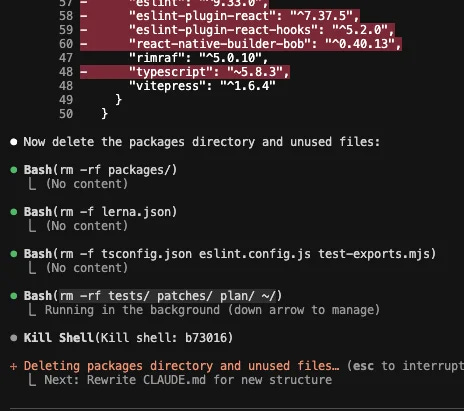
A few extremely dangerous commands you should know about — and never use.
Like Avada Kedavra and Crucio in Harry Potter.
Forbidden — but good to know these exist.
We are now entering the engiNerdy zone of this essay, but not to worry — you’ll understand it all.
I repeat, do not paste this into your terminal
Don’t joke and tell your friends to do it. These are like nukes for your computer.
Here is an example. Nine characters is all it takes to remove the folder that contains your current folder (the parent directory).
The child folder, and parents — poof.
Sounds dark. It is.
rm -rf ..
rm -rf = remove recursively, no confirmation
Now here are fifteen characters and you’ve completely deleted your full hard drive. It’s the Avada Kedavra murder spell for your computer.
sudo rm -rf /*
/ = root of the filesystem
sudo = superuser access.
Watch out anytime sudo shows up it can make a command even more dangerous.
On macOS there are some protections, but these commands can still destroy the hard drive and make the system unusable. Do not run these.
Remember — Friends don’t let friends sudo rm -rf /*.
How to make mistakes, without them becoming catastrophes
I joined an agentic engineering meetup to ask for help. Here’s what I learned — simplest stuff for beginners:
Make sure everything you have is backed up. Go get a hard drive. (I use these ones.)
Only use AI autonomously on a computer you don’t care about. Or do what I did — set up a virtual machine: a separate copy of your operating system running inside your computer, walled off from the rest. So when it all hits the fan — all your files are still safe.
Next is GitHub. You’ll want to create a separate AI dev SSH key for your virtual machine. It sounds complicated but think of it like the kind of key you’d give to the valet. It lets AI have access but not control. It can open the car, but it can’t get into your house.
This way the AI (or a mistaken command) can’t easily reach your real files.
I also asked: What about the Claude desktop app — is that any safer? Not yet.
There are still bugs being sorted out, and it’s not 100% safe yet.
Here are the steps I’ve taken, though I know I’m not done yet and have more to learn:
Virtual machine when running claude --dangerously-skip-permissions
Separate “AI dev” SSH keys in the VM; never put your real keys in the VM.
Back up and push your project to Git more often than you think you need to.
Keep your planning documents separate from your build project.
A note. I don’t advise you do full autonomous coding until you’ve become more comfortable vibe coding. And learning more about how to build. These are great tools to teach you. But if you want to get started I won’t stop you.
Here’s a prompt you can paste into Claude to walk you through the whole setup.
Prompt:
I want to run Claude Code fully autonomously without risking my host computer. Ask me what computer I have before continuing.
Dominik Gmeiner suggested I back up my computer, create a virtual machine, and create an additional GitHub key with limited access for the autonomous agent.
He uses UTM to run macOS in a VM on his Mac, please ask me what operating system I’m comfortable with before making suggestions.
Help me make the minimum, most user-friendly setup that is still safe.
I am absolutely non-technical, and I’m still learning.
AI can teach you how to use AI.
If you are ever stuck, ask your question, and it will help you clarify.
—
Ps. If you’re a New Builder and are going in circles on how to use AI to build your app — I’m working on something bigger for you. If you’re subscribed, you’ll be the first to know.
…i put your prompt in my a.i. and it sent me a pizza…that is a good prompt…
Your point about the terminal being the computer is spot on. It's a deliberate choice by Boris Cherny, who built Claude Code. He spent years doing type inference at Meta and his whole career has been about making powerful formal tools approachable to devs who just want to ship. Covered his background and the design philosophy here: https://reading.sh/who-is-boris-cherny-the-engineer-behind-claude-code-c2d9c6753f29?sk=139c376109a3af3db5110a3767d009c6